
Last updated on
Nov 6, 2026

SSA-455-OCR-SM 2013-2026 free printable template
pdfFiller is not affiliated with any government organization

Fill out
Complete the form online in a simple drag-and-drop editor.

eSign
Add your legally binding signature or send the form for signing.

Share
Share the form via a link, letting anyone fill it out from any device.

Export
Download, print, email, or move the form to your cloud storage.
Why pdfFiller is the best tool for your documents and forms


End-to-end document management
From editing and signing to collaboration and tracking, pdfFiller has everything you need to get your documents done quickly and efficiently.
Accessible from anywhere
pdfFiller is fully cloud-based. This means you can edit, sign, and share documents from anywhere using your computer, smartphone, or tablet.
Secure and compliant
pdfFiller lets you securely manage documents following global laws like ESIGN, CCPA, and GDPR. It's also HIPAA and SOC 2 compliant.
What is SSA-455-OCR-SM
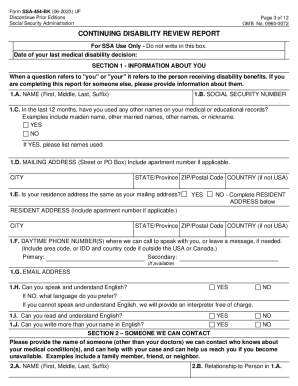
The Disability Update Report (Form SSA-455-OCR-SM) is a government form used by beneficiaries to update their disability status for the Social Security Administration.
pdfFiller scores top ratings on review platforms




Works very effectively, lots of options for amendments
Program is fantastic. Using it is simple, quick and has everything you need to complete a task. Just upload the PDF file and you are set to go.
Works good so far. intuitive enough for me.
PDF filler is really useful to use in all business aspects.
The products are awesome and have been essential to the success of my business!
The forms are very easy to access and to use. The ability to have access to such a variety of forms especially IRS forms. The freedom of use to so many forms and the ability to upload your own created forms far exceeds so many other products that have so many limitations on the use of their products.
My only complaint is that sometimes it is a little difficult to find certain forms that you are looking for but it is usually remedied rather quickly.
This organization helps me build my…
This organization helps me build my business and all the forms I need.
Who needs SSA-455-OCR-SM?
Explore how professionals across industries use pdfFiller.

SSA-455-OCR-SM is needed by:
-
Individuals receiving Social Security disability benefits
-
Beneficiaries required to report changes in health or work status
-
Social Security Administration representatives
-
Caregivers assisting disabled individuals with form completion
-
Legal advisors helping clients with disability claims
Comprehensive Guide to SSA-455-OCR-SM
What is the Disability Update Report?
The Disability Update Report, specifically Form SSA-455-OCR-SM, is essential for ensuring that beneficiaries of Social Security Administration (SSA) disability benefits maintain accurate records of their health and work status. This form is critically relevant for updating the SSA about any changes in disability status, as timely updates can significantly impact the management of ongoing disability benefits.
By filing this report, individuals help the SSA assess their continuing eligibility for benefits and ensure that their cases accurately reflect current conditions. Understanding this report is crucial for beneficiaries who wish to avoid any interruptions in their benefits.
Purpose and Benefits of the Disability Update Report
The primary purpose of the Disability Update Report is to provide necessary information to the SSA regarding a beneficiary's ongoing eligibility for disability benefits. There are several benefits associated with completing this report, including:
-
Helping the SSA assess ongoing eligibility for benefits.
-
Preventing potential interruption or suspension of payments.
-
Ensuring an accurate evaluation of health and work status.
These advantages illustrate why it is imperative to submit this report whenever changes occur.
Who Needs to Complete the Disability Update Report?
Beneficiaries receiving disability payments from the SSA must complete the Disability Update Report. Specific individuals who need to submit this form include:
-
Those whose medical conditions have changed significantly.
-
Beneficiaries starting or stopping work activities.
-
Individuals undergoing changes in training or educational programs.
Timely compliance with these requirements is crucial for maintaining disability benefits and avoiding lapses in payment.
When and How to File the Disability Update Report
Filing the Disability Update Report must be done within a specific timeline to avoid complications. Beneficiaries are required to submit their reports within 30 days of receiving notification from the SSA. The filing process includes the following steps:
-
Access the report through the SSA's website or use pdfFiller for convenience.
-
Fill out the form completely, ensuring all necessary sections are completed.
-
Review the form for accuracy before submission.
By adhering to this timeline and following these steps, beneficiaries can prevent the potential suspension of their benefits.
Filling Out the Disability Update Report: Step-by-Step
Completing the Disability Update Report accurately is crucial. Beneficiaries should carefully fill out specific fields, such as 'WORK BEGAN,' 'WORK ENDED,' and 'MONTHLY EARNINGS.' Here are important tips for ensuring accuracy:
-
Double-check all personal information for correctness.
-
Be precise in the reporting of work activities.
-
Avoid common mistakes in the sections that are frequently overlooked.
Taking the time to avoid errors will streamline the submission process.
Review and Submission of the Disability Update Report
Before submission, reviewing the Disability Update Report is a critical step. This includes verifying all entries and ensuring a signature is present. Methods for signing include:
-
Applying a digital signature through various online platforms.
-
Using a wet signature if preferred.
Furthermore, the completed form can be delivered to the SSA through several options, ensuring it reaches the appropriate office in a timely manner.
What Happens After Submission of the Disability Update Report?
Once the Disability Update Report is submitted, beneficiaries can expect a confirmation of receipt and potential timelines for response. It is also important to check the status of the application after submission. Common reasons for rejection include:
-
Incomplete information on the report.
-
Missing signatures or incorrect signing methods.
Understanding these factors can help mitigate delays in processing.
Data Security and Compliance for the Disability Update Report
Users can rest assured knowing that their information is secured during the Disability Update Report process. pdfFiller implements several protective measures, including:
-
256-bit encryption to safeguard personal data.
-
Compliance with HIPAA regulations to protect medical information.
Beneficiaries should also be aware of record retention guidelines for documenting their submissions for future reference.
Utilizing pdfFiller to Complete Your Disability Update Report
pdfFiller is an excellent tool for beneficiaries completing their Disability Update Report. With features such as:
-
Editing and annotating forms easily.
-
eSigning documents securely online without downloads.
The platform offers a user-friendly experience, guiding beneficiaries smoothly through the process of updating their disability status.
How to fill out the SSA-455-OCR-SM
-
1.To access the Disability Update Report on pdfFiller, visit the pdfFiller website and use the search bar to find 'Disability Update Report' or navigate directly to the form link provided.
-
2.Open the form in the pdfFiller interface to begin filling it out. You will see various fields including checkboxes and text fields, which require your input.
-
3.Before starting the form, gather all necessary information, including your current health status, any changes in work activity, and monthly earnings to ensure accurate completion.
-
4.As you fill out the form, use the provided instructions on pdfFiller to guide you through the fields. Typically, you will need to select checkboxes for relevant updates and enter your information into designated text fields.
-
5.Review each section of the form for clarity and accuracy. Ensure that all mandatory fields are completed and all necessary updates regarding your disability status are reported.
-
6.Once you have filled out the form completely, carefully review your entries to avoid mistakes. Double-check your signature as it must match your usual signature.
-
7.After finalizing the form, save your completed document by clicking the 'Save' button in pdfFiller. You also have options to download the form or submit it electronically.
-
8.To submit the completed form, follow the instructions on pdfFiller for submitting to the Social Security Administration or download it for mailing purposes.

Who needs to fill out the Disability Update Report?
Individuals receiving Social Security disability benefits must fill out this report to update their disability status and comply with Social Security Administration requirements.
What is the deadline for submitting the Disability Update Report?
Beneficiaries must submit the completed Disability Update Report within 30 days of receiving it to avoid any potential suspension of disability payments.
How can I submit my Disability Update Report once completed?
After completing the form, you can submit it electronically through pdfFiller or download it for mailing to the Social Security Administration.
What supporting documents are required with the Disability Update Report?
Typically, supporting documents are not required with this report; however, having accurate health records and work information will aid in completing the form effectively.
What common mistakes should I avoid when filling out this form?
Ensure that all fields are filled accurately and that your signature is consistent with your official documents. Double-check your information before submission to prevent delays.
How long does it take to process the Disability Update Report?
Processing times can vary; however, you should expect to receive confirmation of your submission from the Social Security Administration within a few weeks.
Is the Disability Update Report form available in languages other than English?
The standard Disability Update Report is primarily available in English. Check with the Social Security Administration for potential translation options.
SSA-455-OCR-SM Form Versions
Related Content
Related Forms




Get the latest insights from our blog


If you believe that this page should be taken down, please follow our DMCA take down process
here
.
This form may include fields for payment information. Data entered in these fields is not covered by PCI DSS compliance.